You can take photos directly from the ride tracking screen while recording your ride. Every photo you take is automatically attached to your ride and pinned to your ride map, making it easy to remember exactly where each photo was taken.
Taking photos directly in Equilab reduces the risk of ride interruptions. Opening your device's camera app may cause the operating system to suspend or close Equilab in the background to free up system resources, interrupting your tracking. Using the in-app camera helps avoid this.
This feature is available on both iOS and Android 10 or later.
How to take photos during a ride
- Start tracking your ride as usual
- On the tracking screen, tap the camera icon in the bottom-right corner
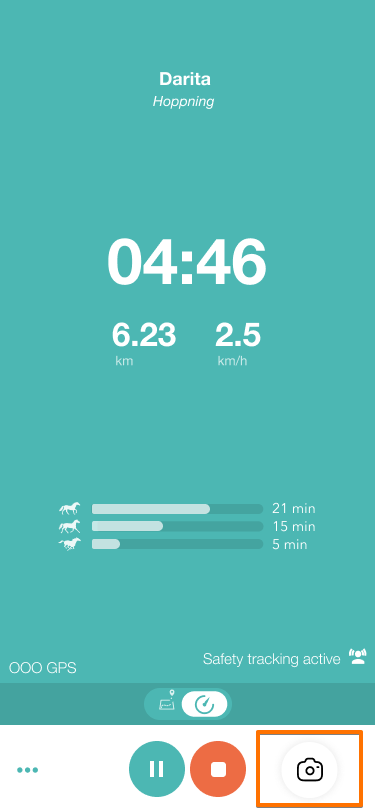
- Take your photo
- Continue your ride
You can take as many photos as you'd like during your ride.
Where can I find my photos?
When you finish and save your ride:
- All photos taken during the ride are automatically added to the ride summary
- Your ride map will display a small camera pin for each photo
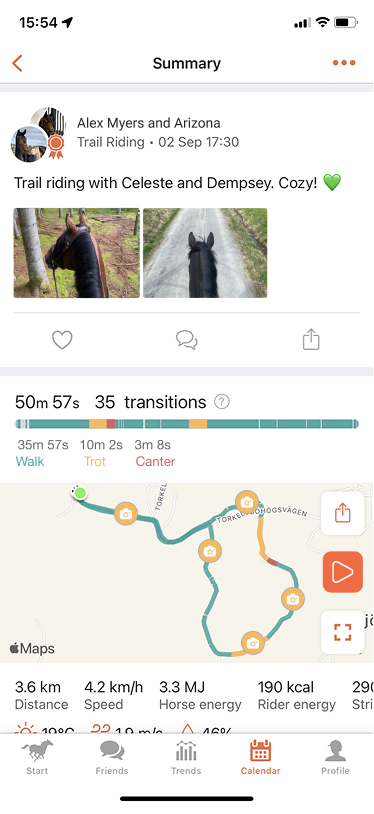
- Maximize the map view, and tap any camera pin to view the photo and see exactly where it was taken
This makes it easy to revisit memorable moments and see where each photo was captured along your route.
If you've granted Equilab permission to save photos to your device, the photos will also be automatically saved to your device's photo gallery (camera roll). This feature is supported on iOS and Android 10 or later and is not available on older Android versions.
See the feature in action
Watch this video to see how the feature works: Take photos during your ride!
If you have any additional questions, please feel free to contact us at support@equilabapp.com. We're always here to help.
Was this article helpful?
That’s Great!
Thank you for your feedback
Sorry! We couldn't be helpful
Thank you for your feedback
Feedback sent
We appreciate your effort and will try to fix the article